Clients see the inspections and checklist work at their buildings and read how your team handled each problem they reported, without emailing your office to ask.
Property managers want proof that the cleaning was done and a clear answer when something goes wrong, which usually means emails and calls to your office. The Clean Smarts customer portal gives each client contact a free login to the completed inspections and checklist work at their buildings. Clients report problems with photos and read your team's follow-up notes, and building occupants rate a room from a QR code without an account.
Inspection results clients can open
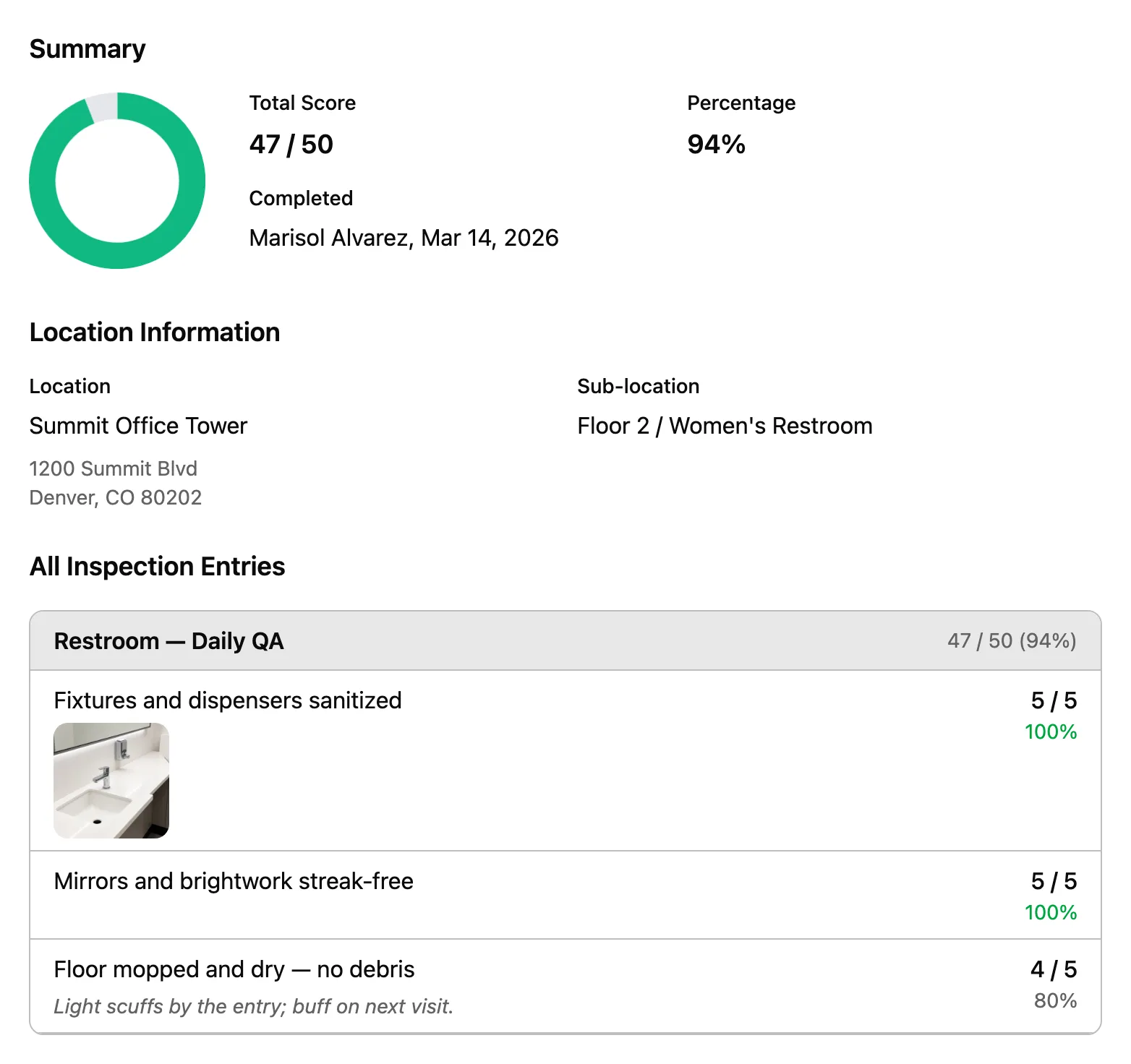
When a client asks for proof, the inspections are already in the portal. A client contact signs in on the web or in the mobile app and opens the completed inspections for their buildings, with each item's score, the inspector's notes and the photos.
Reports that reach your office
A client reports a problem with photos, and your office is notified instead of hearing about it later in a hallway. Your team's follow-up note appears on the issue, and clients who turn on notifications get it by push, email or text.
Feedback from building occupants
Occupants scan a QR code in a restroom or break room, rate it from one to five stars and leave a comment, with no account. Each submission is saved as an issue, so your office hears about an empty soap dispenser from the person who found it.
Free logins for client contacts
Customer logins are free, so every property manager who wants one can have one. Each login sees only the locations you assign to it.
A property manager who cannot see your work asks for proof by email, and a complaint left on a supervisor’s voicemail can come up again at contract renewal. The customer portal gives each client contact a login to the inspection results for their buildings and a place to report problems. Your client sees the work and your response for themselves, and your office spends less time answering emails about it.
Clients check inspection results for their buildings themselves
When a client wants proof that the work was done, someone in your office usually has to pull a report and send it. The facility manager at Summit Office Tower signs in on the web or the mobile app and opens the completed inspections at that building, with each item’s score, the inspector’s notes and the photos. Customer logins are free, so each contact who asks for proof gets it without a request to your office.
A client contact sees the same inspection detail your inspector submitted.
Show clients how you handled each problem they reported
A complaint made by phone or in a hallway leaves no record of what your team did about it. A property manager reports a problem with photos in the portal, your office is notified, and your team’s follow-up note reaches the client by push, email or text, whichever they turned on. The closed issue shows who reported it, who closed it and when, so you have a record of the response when the account comes up for renewal.
What your client sees
Issue #2817
Closed
Customer Visible
Summit Office Tower / Floor 2 Elevator Lobby
Created
Dana Whitfield Mar 18, 2026, 9:12 AM
Closed
Andre Osei Mar 18, 2026, 10:47 AM
Description
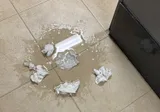
Water on the floor outside the women's restroom by the elevators, with paper towels all over it. Someone could slip.
Follow-up Notes
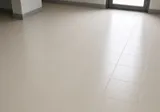
Mopped and dried the floor and restocked the paper towels. The water came from a leaking sink drain, and we told your building engineer.
Attachment (2)
before
after
What Dana's phone says
CS
Clean Smarts
Request closed
Andre Osei@Summit Office Tower / Floor 2 Elevator Lobby—Mopped and dried the floor and restocked the paper towels. The water came from a leaking sink drain, and we told your building engineer.
The client reported it at 9:12 and had the answer on their phone by 10:47.
Bill for the extra work clients ask for in the portal
Requests for work outside the contract, such as a carpet cleaning before a board meeting, often arrive by email or phone and are easy to lose before billing. In the portal, the request arrives as an issue, and your office can convert it to a work order that you schedule and bill like any other. The extra work your client asked for has a work order to bill from, instead of being done for free.
Hear from building occupants without giving them a login
The tenant who finds an empty soap dispenser often has no easy way to tell your team, so the problem waits until the property manager hears about it. A QR poster in a restroom or break room lets that tenant leave a comment and a one-to-five star rating, with no app or account. The comment is saved as an issue and your office is notified, and on the Expert plan your logo replaces the Clean Smarts logo and the page can show the last two cleanings.
Floor 3 Men's Restroom
Please complete the form below to submit feedback
Comments
The soap dispenser at the second sink is empty, and there are no paper towels.
How would you rate the cleanliness of the room?
Submit
What the scan creates in Clean Smarts
An open issue at Harborview Corporate Center / Floor 3 Men's Restroom
Your office is notified, and the client contact for Harborview sees the issue in the portal.
A 2-star rating
The rating and the comment appear on your Ratings report for that restroom.
An occupant at Harborview Corporate Center reports an empty soap dispenser from the restroom.
Share only what you choose with each client
Before you give a client a login, it is fair to ask what else that client will see. Each client login sees only the locations you assign to it, and issues your team logs stay internal unless someone with company issue access marks them Visible to customer. Client conversations happen in a customer thread for each location, separate from your crew’s thread, as part of location messaging, so your client sees what you decide to share.
With the portal, a client can check your inspections and see how you handled each problem without emailing your office, and that record is there at renewal.
Clients see the locations you assign to them. With the default Customer access they can open completed inspections, see the checklist tasks and scans your cleaners completed, follow the issues that are visible to them, and message your team in their location's customer thread. They can also report issues and request supplies.
Do customer logins cost extra?
No. Customer logins are free, so you can give one to each property manager, facility manager or tenant contact who needs it.
Can clients create work orders?
No. A client's request is saved as an issue. Your office reviews it and can convert it into a work order, which you can schedule and bill like any other work order. The issue then shows the number of its related work order.
Do building occupants need an account to give feedback?
No. An occupant scans the QR code posted in the area, writes a comment and can rate cleanliness from one to five stars. The comment is saved as an issue at that location, and the star rating is saved to your Ratings report. The page runs a captcha check and accepts one submission per area every five minutes.
Will clients see our internal issues?
No. Issues your team logs stay internal unless someone with company issue access turns on Visible to customer for that issue. Issues that clients or occupants report are visible to the client from the start.
Is the portal branded with our logo?
On the Expert plan, white-label branding shows your logo instead of the Clean Smarts logo on the QR feedback page, on inspection reports and on the quote approval page. On other plans, those pages show the Clean Smarts logo.
What language do clients see?
Each client uses Clean Smarts in the language set on their account, and issue notifications are translated into that language before they are sent. The QR feedback page displays in the language set for that location's public page.
Start free trial
Start your 14-day free trial. Card required to start — cancel anytime.